

A polished weekly menu isn’t enough to justify an ai meal planning app subscription. The real test is whether the plan connects to what you’ll cook, what’s already in your pantry, and what you need to buy. Without that handoff, AI can generate ideas while leaving the work to you.
It’s reasonable to question crowded feature lists, especially when a basic tool may not connect meal planning with shopping or pantry management. A plan only helps if the app can reflect your preferences, schedule, and nutrition targets instead of producing suggestions you have to rebuild.
This guide explains what to compare before subscribing: personalization, recipe and nutrition tools, pantry tracking, shopping-list workflow, and the difference between home-cooking features and professional kitchen capabilities. You’ll learn to assess value by fit and follow-through, not feature count or unsupported price claims. We’ll also look at how AKROUN FOOD AI connects planning with recipe creation, pantry inventory, nutrition analysis, and shopping lists, and how those everyday needs differ from advanced tools such as batch scaling and food costing.
Key Takeaways
- Judge an ai meal planning app subscription by how well it supports the tasks you repeat, not by the length of its feature list.
- Separate everyday planning and adjustment tools from specialized capabilities that may matter only to certain households or professional kitchens.
- Compare personalization, pantry tracking, nutrition, shopping, and professional tools, then verify current plan details with each provider.
- Use a practical decision process: identify your biggest planning task, test the workflow, confirm subscription terms, and decide whether the fit is worth paying for.
- See how AKROUN FOOD AI connects meal planning with cooking tasks, while distinguishing everyday capabilities from advanced kitchen tools.
What Does an AI Meal Planning App Subscription Actually Include?
An ai meal planning app subscription provides recurring access to software that helps organize meal decisions and related kitchen tasks. Depending on the provider and plan, it may connect preferences and nutrition goals with meal plans, recipes, pantry inventory, shopping lists, and cooking guidance. A recipe collection gives you options to browse. A planning subscription may help coordinate what to make, what ingredients you have, and what to buy across your regular cooking routine.
That distinction matters. Generating a recipe is a single task; maintaining a useful planning workflow means revisiting preferences, adjusting plans, checking ingredients, and preparing a shopping list. Some apps use AI to recommend options. A recommender system is one way software can suggest options based on information such as user preferences. The AI label alone doesn’t tell you how much of the workflow an app supports.
Which tasks can a meal-planning subscription connect?
A connected workflow can move from your preferences and goals to a practical plan, then link planned meals to recipes and shopping needs. If the platform includes pantry inventory, that information may also inform meal choices. For example, tracking ingredients on hand gives the planner more context than treating every meal plan as a fresh start.
Look for the handoffs between steps, not just the feature names. Can you move from a plan to its recipes and shopping list? If you change a meal, do the related details update? Check which functions come with the specific subscription you’re considering, since feature access and limits vary by provider and tier.
Who is an AI meal-planning app designed for?
Home cooks may want help organizing weeknight meals, keeping household preferences in view, or turning planned recipes into a shopping list. Needs differ: one person may prioritize flexible recipes, while another may need pantry tracking or nutrition analysis. The right fit depends on which repeated tasks take the most attention, not on whether an app claims to serve every household.
Culinary professionals have different operational requirements. A kitchen may need to scale batches, maintain ingredient cost books, or calculate portion food costs, capabilities that may sit in higher subscription tiers. AKROUN FOOD AI connects recipe creation, meal planning, pantry inventory, nutrition analysis, shopping lists, and cooking guidance. Its higher tiers include professional tools such as batch scaling and food costing. Verify current plan names, included features, and billing terms directly before choosing.
Which AI Meal Planning Subscription Features Matter Most?
Compare how well a subscription supports a complete routine, not how many features it advertises. Four tests help separate useful capabilities from extras: workflow continuity from plan to shopping, personalization to your preferences, visibility into ingredients and nutrition information, and ease of adjustment when your schedule or plans change.
Start with the functions you’ll use repeatedly. A home cook may value editable meal plans, recipes, and a shopping list more than commercial costing tools. A culinary professional may have the opposite priorities. Meal preparation can support a more organized food routine; Harvard T.H. Chan School of Public Health outlines the benefits of meal prep. The subscription should make that routine easier to manage, not add steps.
Does the app adapt plans to your preferences and goals?
Check whether you can set the dietary preferences, restrictions, and nutrition targets relevant to you. Then inspect the recommendations: can you swap a meal or adjust the plan without starting over? Clear controls matter more than a claim of personalization. If nutrition analysis is included, review how the platform presents its information and any stated limitations. An app isn’t a substitute for individualized clinical nutrition advice.
Do planning, pantry, and shopping features work together?
Test the handoffs. When you select a recipe, does it carry into a shopping list you can use? Can pantry inventory inform suggestions, or must you repeatedly enter the same ingredients? These details reveal whether a product connects tasks or simply places separate tools under one subscription. Confirm which features are included in the plan you’re evaluating, since availability isn’t universal.
AKROUN FOOD AI brings recipe creation and meal planning together with pantry inventory, nutrition analysis, shopping lists, and cooking guidance. To assess the workflow, check whether the steps match your own routine and verify current plan details rather than assuming every task is automated or included at every tier. Review connected meal-planning capabilities.
Use this checklist to compare subscriptions:
- Continuity: Can you move from a plan to recipes and shopping needs?
- Personalization: Are preferences and targets configurable, and can you edit recommendations?
- Visibility: Are pantry and nutrition details clear enough to inform your decisions?
- Control: Can you revise a plan when ingredients or schedules change?
- Fit: Are specialized professional tools relevant to your work, or are they features you won’t use?
How to Compare AI Meal Planning App Subscriptions for Real-World Value
Test the same tasks in each option. A feature label tells you what a provider says it offers; the practical test is whether you can use that feature in your routine and how much work remains after a plan is generated. Use this matrix to compare an ai meal planning app subscription with other options, then verify each provider’s current plan page for included features, usage limits, and billing terms.
| Capability | What to check | Who may prioritize it |
|---|---|---|
| Planning | Can you create, review, and revise plans on a cadence that suits your routine? | Home cooks and food-service teams |
| Personalization | Can you enter relevant preferences and goals, then edit suggestions that don’t fit? | Anyone with specific preferences or constraints |
| Pantry | Can inventory inform meal choices, and how much updating does it require? | Cooks who track ingredients on hand |
| Nutrition | Are nutrition details available and presented clearly enough for your needs? | Users who want nutrition information |
| Shopping | Do selected recipes connect to a usable list, or do you need to prepare one separately? | Anyone who shops from a plan |
| Professional tools | Are batch scaling, ingredient cost books, or portion food costing included? | Culinary professionals |
Subscription value comes from repeated workflow fit, not feature count. Account for the work after generation: reviewing suggestions, editing meals, updating inventory, and preparing a list. A planner may produce a coherent menu yet still require substantial manual work to make it usable.
How should home cooks judge recurring usefulness?
Test the planner against a typical week, not an idealized one. Consider your actual cooking days, shopping routine, and the changes that come up, such as a schedule shift, an ingredient you can’t use, or a meal you want to replace. See whether the plan accommodates those changes without forcing you to rebuild the whole workflow. Focus on fit and follow-through, not an assumed savings outcome.
What should culinary professionals compare separately?
Assess commercial requirements on their own terms. Batch scaling, ingredient cost books, and portion food costing support different work from household meal planning. Confirm whether the tools you need sit in a higher subscription tier and whether they’re currently available. AKROUN FOOD AI’s higher tiers include professional tools such as batch scaling and food costing. Verify current plan details before comparing them with household features.
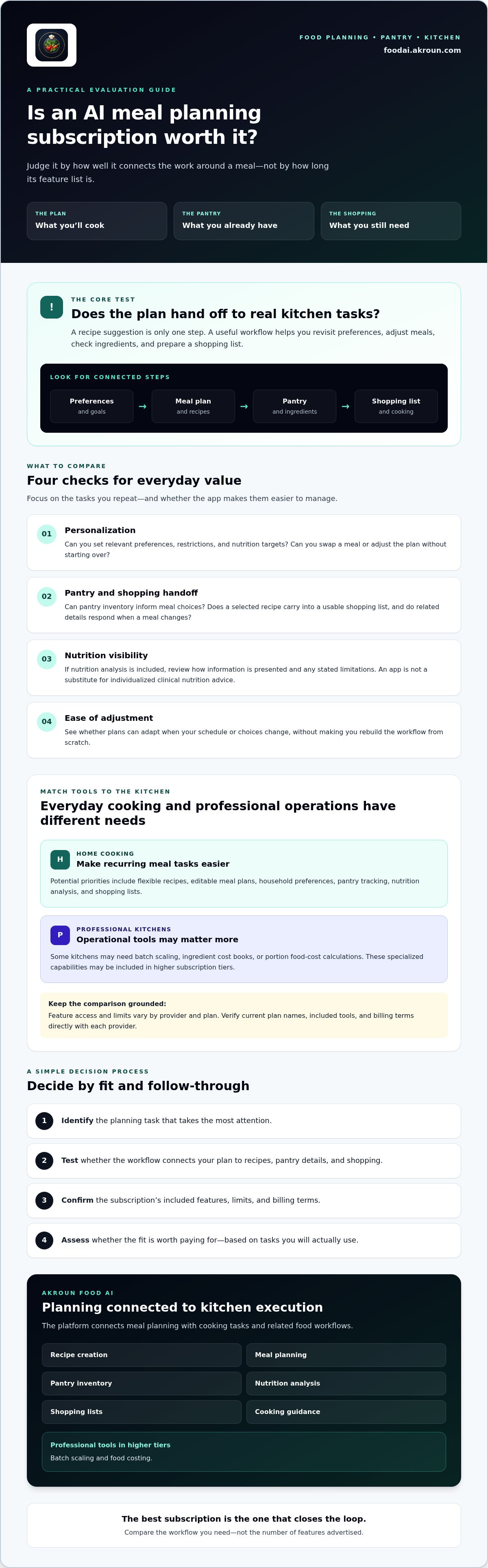
How to Decide Whether a Paid AI Meal Planner Fits Your Routine
A subscription should reduce friction in tasks you already repeat. Before choosing an ai meal planning app subscription, pinpoint where your current process breaks down: deciding what to cook, keeping preferences in view, tracking pantry items, or turning recipes into a shopping list. More generated content doesn’t automatically mean less work. The test is whether the tool simplifies steps you actually want to simplify.
Use this four-step decision process:
- Define the task. Identify which food-planning activities take the most attention, and choose the one you want the app to support first.
- Test workflow fit. Use realistic preferences and a representative week to see how well the app handles your routine and changes.
- Verify plan details. Check the provider’s current feature limits, billing terms, privacy disclosures, and account controls. Confirm cancellation terms directly rather than assuming them.
- Decide based on use. Compare the work the app removes with the effort it still requires, then weigh that against the recurring commitment.
What should you test during an initial evaluation?
Enter preferences you genuinely use and try a typical week, including a schedule change or an ingredient you need to replace. Notice how much you must correct the plan and whether recipes, pantry information, and shopping outputs stay aligned after edits. If a provider offers trial or preview access, verify its current availability and terms on the provider’s own site. Don’t assume that access is standard across subscriptions.
When is a subscription probably not the right fit?
If you search for recipes only occasionally, a recipe collection or basic search may cover your needs without a connected planning subscription. Automated suggestions may also require additional review when your needs are strict or complex. Nutrition outputs aren’t individualized clinical advice, so don’t rely on them as a substitute for appropriate professional guidance.
Before committing, compare how often you expect to use the service with its recurring billing terms. Check how to manage the account and end the subscription, and confirm any applicable cancellation conditions directly with the provider. The best fit supports your routine without adding more review and maintenance than it removes.
To assess a connected culinary workflow against your needs, explore AKROUN FOOD AI.
How AKROUN FOOD AI Connects Meal Planning to Kitchen Execution
AKROUN FOOD AI is a connected culinary assistant, not just a generator of menu ideas. Its capabilities include recipe creation, meal planning, pantry inventory, nutrition analysis, shopping lists, and cooking guidance. Assess how those tools support the steps around a meal, from deciding what to make to preparing ingredients and cooking. As with any ai meal planning app subscription, check current plan details to confirm which features are included in the option you’re considering.
How does the platform support home cooking workflows?
For home cooks, planning can connect with recipes and pantry inventory, while shopping-list generation helps carry selected meals into preparation. For example, inventory can give a plan context about ingredients already on hand, while a list can help organize what else a planned recipe calls for. The platform also provides nutrition analysis, which is informational and shouldn’t be treated as medical advice or a substitute for individualized dietitian guidance.
Connected planning, inventory, recipes, and shopping tools bring everyday kitchen tasks into a more organized workflow. A meal plan can be more useful when it relates to ingredients, recipes, and cooking guidance rather than sitting apart from them. Review the platform’s current feature descriptions to understand what’s available and how each function works.
What changes for professional kitchen users?
Commercial kitchens face different coordination demands. Batch scaling helps address changes in recipe quantity, while ingredient cost books and portion food costing support cost-focused kitchen work. Assess these capabilities separately from household planning functions because they address operational needs beyond organizing meals at home.
AKROUN FOOD AI includes professional tools in higher subscription tiers. Don’t assume a particular feature is included in every plan or infer the current tier structure from a general feature overview. Check the provider’s current subscription information for plan names, feature availability, and billing terms before deciding. This gives home cooks and culinary professionals a clearer basis for judging whether the platform’s connected capabilities match their routine.
If the workflow aligns with your needs, explore AKROUN FOOD AI and verify the current subscription details before choosing.
Choose a Meal-Planning Workflow You’ll Actually Use
The right ai meal planning app subscription should support more than a quick burst of menu ideas. Compare how well each option carries your preferences into plans, recipes, pantry decisions, and shopping, then check current feature access and billing terms before you commit. The strongest fit supports tasks you repeat without adding unnecessary review or upkeep.
AKROUN FOOD AI connects meal planning with recipes, pantry inventory, nutrition analysis, and shopping lists. For professional kitchens, higher subscription tiers include capabilities such as batch scaling and portion food costing. Check current plan details to confirm which tools match your needs.
Ready to assess that connected workflow for your kitchen? Explore AKROUN FOOD AI and review the subscription information before deciding.
Frequently Asked Questions
What is included in an AI meal planning app subscription?
Inclusions vary by provider and plan. A subscription may provide recurring access to personalized meal planning, recipe generation, nutrition analysis, pantry tools, shopping lists, or cooking guidance, but no feature is universal. Check current plan details to see what’s included and whether limits apply. The practical difference from a recipe collection is whether the service supports repeated tasks, such as revising a plan and organizing ingredients for selected meals.
Is an AI meal planning app subscription worth paying for?
An ai meal planning app subscription may be worth paying for if you plan meals regularly and its connected tools reduce work you repeat. Compare your current routine with the app’s actual output: do recipes and lists help, or do you still spend time correcting plans and updating ingredients? A paid tool won’t suit everyone. Check feature limits and recurring billing terms before deciding whether the workflow fits your use.
Can an AI meal planning app account for dietary preferences?
Some apps let users enter dietary preferences, exclusions, or nutrition goals, but available controls and recommendation behavior vary by service. Check whether you can review and adjust suggested recipes, especially when an ingredient or meal doesn’t fit your needs. Nutrition analysis can provide useful information, but automated suggestions aren’t a substitute for individualized medical nutrition guidance when you have a clinical need.
How do I compare AI meal planning app subscription plans?
Compare functions you’ll use regularly, not the longest feature list. Check meal planning, recipe generation, pantry management, nutrition outputs, shopping lists, and any usage limits. If you work in a commercial kitchen, assess batch scaling and costing tools separately from household features. Confirm current prices, billing periods, included capabilities, and cancellation terms directly with each provider, since plan details can change and vary by subscription.
Do AI meal planning apps create grocery shopping lists automatically?
Some services generate shopping lists from selected meals, but the process differs by app and plan. Check whether ingredients from multiple recipes are combined, whether pantry items can be accounted for, and whether you can edit the final list. Don’t assume the app synchronizes inventory or removes duplicate ingredients. Before relying on a list for shopping, verify that the specific subscription supports the steps you need.
Can an AI meal planner help professional kitchens?
Some culinary platforms offer tools designed for professional workflows, such as batch scaling, ingredient cost books, and portion food costing. These capabilities can be relevant when kitchens need to manage recipe quantities and ingredient costs, but they aren’t standard in every meal planner. Check whether the tools are included in a higher subscription tier and confirm current availability. A consumer-focused plan generator may not cover commercial production requirements.
Does AKROUN FOOD AI offer monthly or annual subscriptions?
Yes. AKROUN FOOD AI uses recurring monthly or annual subscriptions. Its platform connects recipes and meal planning with pantry inventory, nutrition analysis, shopping lists, and cooking guidance. Higher tiers include professional tools such as batch scaling and portion food costing. Confirm current plan options, prices, included features, and billing conditions on the platform before subscribing. Don’t assume that a particular tier, trial, cancellation term, or refund option is available.