

Can a recipe generator turn the half-used vegetables, leftover rice, and pantry staples you already have into dinner? It can offer a useful starting point, but the suggestion still needs to fit your preferences, schedule, and actual ingredients. A recipe generator from pantry ingredients helps you move beyond searches for dishes that call for items you don’t have.
It’s frustrating to enter what’s on hand and get a recipe that depends on missing ingredients or impractical steps. Give the tool clear information, then review its suggestions before you start cooking. This guide explains how pantry-based recipe generation works, which details can make suggestions more relevant, and how to choose a meal that suits your kitchen and plans.
You’ll also learn what to check in a generated recipe, from ingredient quantities and cooking times to dietary preferences and allergens. Some tools find existing recipes that match your ingredients; others generate new combinations. Either way, treat the result as a proposal, not a guarantee. A quick review can help you make a practical choice about what to cook.
Key Takeaways
- A recipe generator from pantry ingredients can turn your inventory into a starting point for dinner, but useful results depend on the information and constraints you provide.
- Before choosing a dish, check ingredient fit, quantities, equipment, cooking time, and personal preferences.
- Build a simple routine: check what you have, prioritize ingredients you want to use soon, and review the recipe before cooking.
- AKROUN AI Chef connects recipe generation and pantry inventory with user-set dietary goals and preferences, which can inform suggestions but don’t guarantee a perfect match.
- Recipe tools vary in how they create suggestions. Knowing whether a tool searches existing recipes or generates them can help you decide what to try.
What a Recipe Generator from Pantry Ingredients Actually Does
You open the fridge and spot cooked rice, a few vegetables, and half a carton of eggs, but no meal comes to mind. The ingredients are there. The plan isn’t.
A recipe generator from pantry ingredients uses the foods you have to suggest dishes you could make. It may match your ingredients to existing recipes or combine them into new ideas, sometimes using added constraints such as dietary preferences or available cooking time. Treat the result as a starting point, not a kitchen-tested promise. Check whether the ingredients, quantities, and method make sense for your situation.
Some tools search for existing recipes that fit an ingredient list; others use generative AI to propose new combinations. This ability to produce novel outputs connects to computational creativity, a field exploring how computers can generate creative work. A generated dish can sound convincing while still needing a cook’s judgment.
What information can you give a pantry recipe generator?
Start with ingredients you can actually use. Include approximate amounts when you know them, and flag anything you want to use soon, such as ripe tomatoes or an open container of broth. This helps distinguish a small garnish from a central ingredient and gives the suggestion a more practical foundation.
Next, add any constraints the tool supports. Dietary goals and food preferences can shape the options, while a time limit can help rule out dishes that take longer than you have. If the tool accepts equipment or skill limits, include those too. For example, noting that you have a stovetop but no oven may help avoid an oven-dependent suggestion. Clear input can improve relevance, but it doesn’t verify the recipe.
How does this differ from searching for a recipe?
A conventional recipe search often starts with a destination: a named dish, cuisine, or main ingredient. Pantry-led discovery starts with your inventory. Instead of searching for “vegetable fried rice” and finding recipes that call for items you’re missing, list what’s on hand and see what combinations might work.
This approach can help you plan around available food before deciding whether you need to shop. It may also suggest options you wouldn’t have searched for directly. Still, check the quantities, method, and substitutions before cooking. The tool offers an idea; you make the final call.
How Pantry Ingredients Become a Suggested Recipe
A useful suggestion starts with useful input. The general workflow is straightforward: enter available ingredients, add relevant constraints, review a proposed dish, and check whether it’s practical to cook. A tool may search for recipes that match your list or use generative AI to form a new combination. Either way, the output reflects the details you supply, not an independent check of your kitchen.
Clear ingredient names, approximate quantities, and stated preferences help a recipe generator from pantry ingredients produce ideas that better fit your meal, time, and cooking setup. Start with what you have, then add context that could affect your choice. The United States Environmental Protection Agency’s Preventing Wasted Food At Home resource also encourages practical approaches to using food already on hand, a useful principle for pantry-led cooking.
Why ingredient detail changes the result
“Beans” leaves room for interpretation. “One can of chickpeas” gives a clearer signal about the ingredient and its likely role in a dish. Be just as specific with leftovers: “leftovers” doesn’t tell a tool whether you mean cooked lentils, roasted vegetables, or pasta. Name the food as precisely as you can.
Approximate amounts help show proportion. A spoonful of tomato paste may work as seasoning, while a nearly full jar could anchor a sauce. You don’t need to weigh every item. Even “about a cup” or “a small amount” gives more direction than an ingredient name alone. Don’t assume a tool can identify foods from a photo unless that capability is confirmed for the specific product.
How preferences and limits guide recipe suggestions
Constraints narrow the options. You might specify a plant-based preference, ingredients you dislike, a short cooking window, or the equipment you can use. If you have only a stovetop, include that detail when the tool accepts it. If a restriction is critical, state it plainly rather than assuming the generator already knows.
AKROUN AI Chef supports recipe generation, pantry inventory management, and user-set dietary goals and preferences. These details can inform suggestions, but they don’t establish how to enter ingredients in the current interface. Check the available workflow rather than assuming particular controls. Preference matching also isn’t medical or allergen-safety verification. When safety matters, check labels, ingredients, and preparation steps yourself.
Before cooking, assess a suggested recipe’s ingredient fit and method. For a connected pantry and recipe-planning workflow, explore AKROUN AI Chef recipe planning as one option, then decide whether the suggestion works for your kitchen.
How to Judge Whether a Pantry-Generated Recipe Will Work
A recipe can read smoothly and still fail in your kitchen. Before you start, check five things: ingredient fit, quantities, equipment, time, and preferences. This review can catch gaps a generated suggestion may miss, such as an unavailable pan, an unrealistic prep window, or a missing ingredient that gives the dish its structure.
A generated recipe is a suggestion, not a verified recipe. Check its ingredients, method, and safety before you cook. Treat the instructions as a draft to assess, especially if the dish includes unfamiliar techniques or food restrictions.
Check ingredient fit, quantities, and kitchen equipment
Scan the ingredient list first. Mark what you have, then decide whether each missing item is essential or flexible. A missing thickener may affect texture; a missing garnish may not change the core dish. If you need a substitution, consider how it could affect flavor, moisture, or cooking time instead of assuming ingredients are interchangeable.
Next, compare quantities with the stated servings. Look for proportions that seem off, such as a very small amount of a main ingredient for several portions or an unusually large amount of seasoning. Then check the method against your kitchen. Does it require an oven, blender, or specialty pan you don’t have? Are the steps within your comfort level? If not, choose a simpler suggestion or adapt the recipe only when you understand what the change will do.
Review restrictions and food safety before cooking
Check every ingredient and substitute against your dietary requirements. Don’t rely on a tool to infer a restriction from a preference, or assume a suggested replacement is suitable. For allergies, verify product labels and preparation details yourself. A generated answer can help organize ideas, but it cannot certify that a meal is allergen-safe.
Review the instructions, too. Cooking times can vary with portion size, ingredient temperature, and equipment, so a plausible-looking time doesn’t prove food is safely cooked. For storage, handling, and safe cooking temperatures, follow current guidance from a trusted food-safety authority, such as the USDA Food Safety and Inspection Service. Use a food thermometer when guidance calls for one, rather than relying on appearance alone.
A recipe generator from pantry ingredients can narrow your options, but your review is the final quality check. Nutrition information or dietary filters are not medical nutrition advice, and they don’t replace professional guidance for health conditions. If a method, quantity, or safety instruction seems unclear, pause and verify it before cooking.
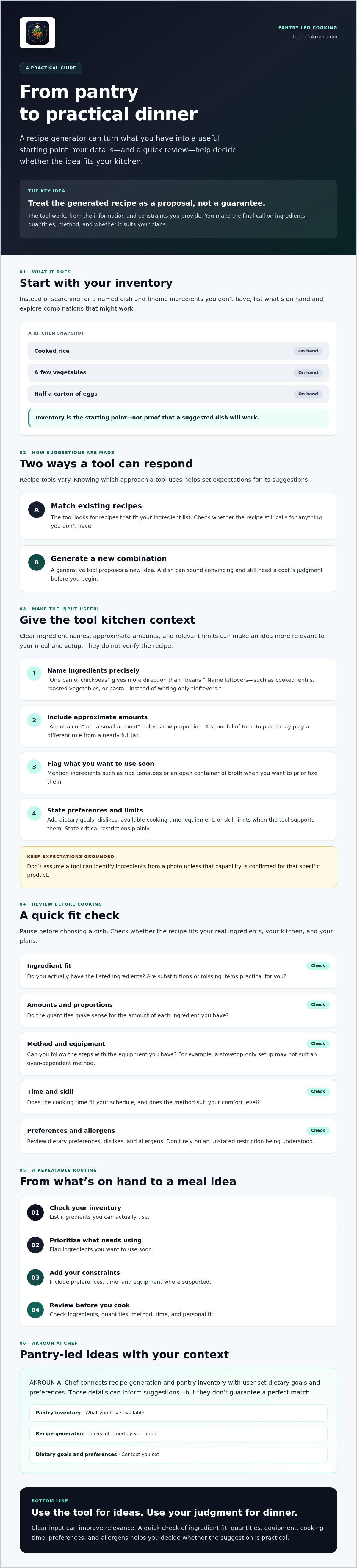
A Simple Workflow for Getting Better Recipes from What You Have
A good pantry-led meal starts with a clear inventory, not a long list of every item in the kitchen. Check what’s available, then prioritize ingredients you want to use soon. A ripe avocado, open container of broth, or leftover cooked grain can shape the meal, while basic seasonings and supporting ingredients help round it out.
Prepare a useful ingredient list
Organize your notes so the recipe tool can distinguish main ingredients from extras. For example, list cooked rice and eggs as the core, then scallions, soy sauce, and oil as supporting items. Add approximate amounts where you know them. Flag anything you particularly want to use, and include how many people you’re cooking for.
Next, state the limits that affect your choice: available time, dietary preferences, and any equipment or skill constraints the tool supports. Specific input can help a recipe generator from pantry ingredients return a more relevant idea, though you’ll still need to assess the method and fit.
Review, refine, and cook with confidence
Before you begin, read the full recipe from start to finish. Confirm that the steps match your equipment, the timing suits your schedule, and the ingredient amounts seem reasonable for the servings. If a suggestion calls for something you don’t have, decide whether it’s essential before leaving it out. Adjust servings carefully: changing amounts can affect cooking time and balance, so avoid scaling ingredients mechanically when the method depends on proportions.
Use this checklist to move from pantry scan to a practical decision:
- Check: Identify ingredients on hand and flag those you want to use soon.
- List: Separate main ingredients, supporting items, and seasonings; add approximate amounts.
- Set: Include servings, available cooking time, and relevant preferences or restrictions.
- Generate: Review the suggested dish and its complete ingredient list.
- Verify: Check quantities, equipment, instructions, and any missing items before cooking.
- Record: Note what worked and what you’d change. If your recipe tool supports saved preferences or history, use those notes to guide future suggestions.
Keep the workflow flexible. A generated idea may need a small adjustment, but avoid changes that make the recipe’s structure unclear. If the method depends on an ingredient or technique you can’t replace confidently, choose another suggestion. For a pantry-led cooking workflow, explore AKROUN AI Chef and see how its recipe and pantry capabilities may fit your planning routine.
Using AKROUN AI Chef for Pantry-Led Recipe Ideas
Choosing a dish is only one part of dinner planning. You also need to keep track of what’s available, consider your preferences, and decide what to cook next. AKROUN FOOD AI brings several of these tasks into one connected culinary platform, combining recipe generation and pantry inventory management with meal planning, nutrition analysis, shopping lists, and cooking guidance.
Where a connected culinary assistant can help
Imagine you have canned beans, a bag of spinach, and rice to use. Pantry information can help shape recipe ideas, while your stated dietary goals and preferences can inform which suggestions may suit you. Meal planning can help carry an idea forward, and shopping-list features can support planning for ingredients that are missing. Cooking guidance and nutrition analysis add other context to the workflow.
The value is in connecting these capabilities, not assuming every suggestion will be a perfect match. Pantry details need to be accurate, preferences need to reflect your needs, and each proposed recipe still deserves a practical review. Check ingredients, quantities, equipment, and instructions before starting. A recipe generator from pantry ingredients can help organize possibilities, but you remain responsible for deciding what works in your kitchen.
When to explore AKROUN FOOD AI
AKROUN FOOD AI may be worth exploring if you want recipe ideas alongside broader meal-planning and pantry-management tools, rather than a standalone way to find a dish. It may suit cooks who want available ingredients and stated preferences to inform recipe suggestions, then use connected planning features for the next steps.
Set the right expectations. AKROUN FOOD AI is software for culinary planning and guidance. It isn’t a meal-kit delivery service or a one-to-one dietitian service, and its features don’t guarantee recipe success, allergen safety, or a particular nutritional outcome. Review generated recipes and nutrition details yourself, especially when you have critical dietary requirements.
If that connected approach fits how you plan meals, Explore AKROUN FOOD AI to learn more about using pantry information and preferences to support recipe planning.
Turn Your Pantry into a Practical Dinner Plan
A recipe generator from pantry ingredients gives you a starting point, not a final verdict. Clear ingredient details and preferences can make suggestions more relevant, while a quick review of quantities, equipment, cooking time, and restrictions helps you decide whether a dish will work.
Keep the process simple: check what you have, flag ingredients you want to use, and assess the full recipe before cooking. A little judgment keeps an appealing idea grounded in your actual kitchen and needs.
For cooks who want recipe ideas connected to broader kitchen planning, AKROUN AI Chef combines AI-powered recipe generation and pantry inventory management with nutrition analysis, shopping lists, and cooking guidance. These tools can support your workflow, but they don’t guarantee recipe success or nutritional outcomes.
Explore AKROUN AI Chef to see whether its connected culinary tools fit the way you plan meals. Start with what’s already on hand, review the suggestion, and make your next dinner decision with confidence.
Frequently Asked Questions
Can I generate a recipe using only the ingredients I already have?
Yes, a pantry tool can suggest dishes built around ingredients you already have, but it may still include staples or items you’re missing. Enter your available foods clearly and flag ingredients you want the recipe to use. Then inspect the full ingredient list before choosing. If a suggestion depends on a missing item, decide whether it can be omitted or replaced without changing the dish’s basic structure.
How do I get better recipe suggestions from pantry ingredients?
Give the recipe generator from pantry ingredients a clear, specific list. Name foods precisely, add approximate amounts, and identify ingredients you want to use first. Include serving needs, available cooking time, and relevant preferences or equipment limits if the tool accepts them. Then review the suggestion’s ingredients and method. Better input can improve relevance, but it won’t remove the need to judge whether the recipe fits your kitchen.
Are AI-generated pantry recipes safe for food allergies?
Don’t assume an AI-generated recipe is safe for an allergy. Check every ingredient, packaged-food label, and suggested substitute against the person’s requirements, and consider cross-contact during preparation. A tool may follow a stated preference, but that isn’t the same as verifying allergen safety. If an ingredient or instruction is unclear, don’t rely on the generated answer alone. Use trusted food-safety guidance and seek qualified medical advice for allergy-related concerns.
What if a suggested recipe includes an ingredient I do not have?
First, decide whether the missing ingredient is central to the dish or mainly adds garnish or seasoning. If it provides structure, moisture, or a key flavor, skipping it may change the result. If it seems optional, you may be able to leave it out. Consider a substitute only if you understand how it could affect taste, texture, and cooking time. Otherwise, ask for another idea using what’s available.
Can a pantry recipe generator account for dietary preferences?
Some tools let users set preferences or dietary goals, though available controls vary. State important requirements clearly rather than assuming a generator will infer them. AKROUN AI Chef supports user-set dietary goals and preferences, which can inform recipe suggestions. That doesn’t guarantee a dish will meet every need or verify that it’s safe for allergies. Review all ingredients, substitutions, and relevant nutrition details before relying on a suggestion.
Do I need to enter exact quantities to generate a pantry recipe?
No, exact measurements aren’t always necessary to get an idea. Approximate amounts still help the tool distinguish a main ingredient from a small leftover. For example, “about a cup of cooked rice” gives more useful context than “rice.” If you don’t know quantities, list the ingredients anyway, then check the suggested amounts and serving size before cooking. Adjust carefully if the recipe’s proportions seem unsuitable.
Is a pantry recipe generator the same as a meal planner?
No. A recipe generator focuses on suggesting or creating a dish, often using ingredients you have. A meal planner helps organize meals across a broader schedule and may connect recipes with pantry tracking or shopping lists. Some culinary platforms combine these functions. AKROUN AI Chef connects recipe generation and pantry inventory management with meal planning, nutrition analysis, shopping lists, and cooking guidance, so its role extends beyond a single recipe suggestion.
