
What good is a digital pantry if it still lists ingredients you used last night? A recipe app with pantry sync can connect what you have to recipes, meal plans, and shopping lists, but that connection is useful only when the inventory reflects what is actually in your kitchen.
That is the sticking point. Pantry records can fall behind after cooking or grocery shopping, while recipes, plans, and shopping tasks may live in separate tools. And “sync” does not always mean automatic updates. Some apps rely on you to maintain inventory; others connect pantry data more directly to meal planning and grocery lists. Knowing the difference helps you choose an app that suits your routine.
This guide explains what pantry synchronization can do, where it still needs your input, and what to check about inventory updates, recipe planning, and shopping-list generation. You will also learn how to assess an app against your cooking and tracking habits, then bring pantry data, recipes, and meal plans into a more dependable workflow.
Key Takeaways
- A recipe app with pantry sync should connect inventory with recipe and meal-planning workflows, not simply store a list of ingredients.
- Check which updates happen automatically and which need your confirmation. A digital pantry stays useful only when it reflects what you actually have.
- Compare how apps handle ingredient details, recipe relevance, and shopping lists before choosing a workflow.
- Start with frequently used staples, then build a routine for reviewing and updating your inventory.
- AKROUN AI Chef brings pantry inventory management, recipe generation, and meal planning into one platform.
What Does a Recipe App with Pantry Sync Actually Do?
Pantry sync connects a digital record of ingredients you have with cooking and planning tasks, such as finding recipes, scheduling meals, or preparing a shopping list. The important distinction is whether pantry information informs more than one step. Sync does not necessarily mean the app detects every item you use or buy. Some updates may depend on you, so check which features share information and which records you need to maintain yourself.
This differs from searching for recipes using ingredients you type into a box. A search might suggest a dish from “eggs, spinach, and rice” without saving those items as inventory or using them again later. A connected workflow can carry pantry context into further planning decisions. That can reduce repeated entry, help surface recipes that fit what is on hand, and show which ingredients may still need to be bought. The result depends on both inventory accuracy and the app’s specific sync behavior.
What information can a digital pantry contain?
A pantry record may include ingredient names and quantities. Some apps support additional details, but do not assume fields such as units, storage locations, or freshness dates are available. Check what you can record and how to correct it. The difference between pantry stock and a shopping-list item matters: rice already in the cupboard is different from rice you plan to buy. Keeping those states distinct can help prevent duplicate purchases.
Also check how planned recipes affect inventory. Does the app show ingredients you may need, or does it adjust recorded quantities? Unless the app explains that behavior, treat any stock change as something to verify rather than an automatic update.
How does pantry sync differ from a recipe generator?
A recipe generator can produce ideas from ingredients you enter for a single search. It may not retain those ingredients, track quantities, or connect the results to a weekly menu or shopping list. Pantry sync is intended to make inventory useful across those decisions, but the level of connection varies by app. Look for clear details about what information carries forward and when you must confirm a change.
Connected kitchens can also involve devices and services that exchange data through the Internet of Things (IoT). But a pantry app does not need a smart appliance to connect planning features, and a smart device does not guarantee accurate inventory. The practical test is whether the app can help you move from recorded ingredients to suitable recipes and clearer shopping needs without hiding what you still need to update.
How Pantry Sync Connects Ingredients, Recipes, and Meal Plans
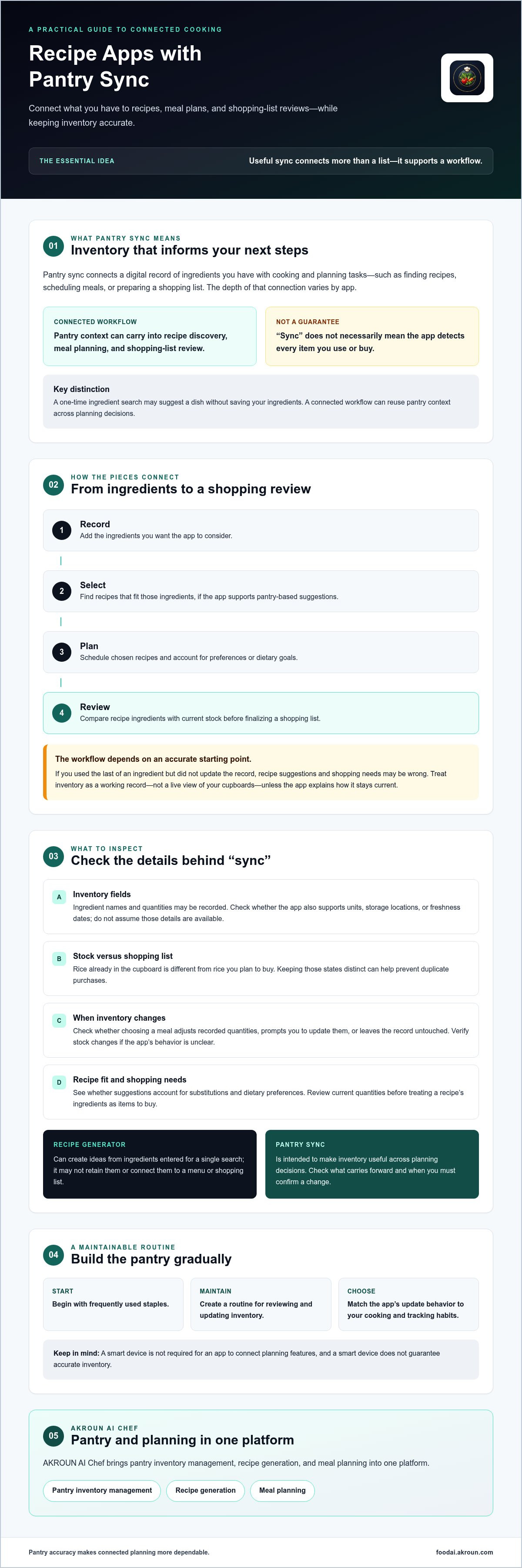
Pantry data can inform meal planning by showing which recorded ingredients may suit planned recipes and which items might need to be purchased. A connected workflow often follows a practical sequence: record ingredients, choose recipes, place meals on a calendar, then review shopping needs. The app may connect these steps, but check where it updates information automatically and where it asks you to confirm.
- Record: Add the ingredients you want the app to consider.
- Select: Find recipes that fit those ingredients, if the app supports pantry-based suggestions.
- Plan: Schedule chosen recipes and account for preferences or dietary goals.
- Review: Check the ingredients needed against current stock before finalizing a shopping list.
The sequence is only as reliable as its starting point. If you used the last of an ingredient but did not update the record, recipe suggestions and shopping needs may be wrong. Treat inventory as a working record, not a live view of your cupboards, unless the app clearly explains how it keeps data current.
From pantry inventory to relevant recipe options
When a recipe app with pantry sync supports inventory-based discovery, available ingredients can help surface dishes that fit what you have. For example, recorded beans and tomatoes might inform dinner suggestions. Substitutions and dietary preferences can also affect whether a suggestion works for your household, so check how the app handles them.
There is an important difference between using an ingredient as context and reserving or deducting its quantity. A recipe suggestion may recognize that you have rice without reducing the recorded amount when you add a meal to your plan. Confirm whether selecting a meal changes inventory, prompts you to update it, or leaves the record untouched.
From meal plan to shopping-list review
Once you plan a recipe, its ingredients can help identify what to shop for. But a list item is not automatically a purchase instruction. Check current quantities first: you may have enough olive oil for the planned meals but not enough lentils. Nutrition.gov offers practical guidance on meal planning and food shopping, including using existing inventory when preparing to shop.
Before relying on a generated list, verify whether the app combines repeated ingredients or accounts for pantry quantities. These details vary by product. AKROUN AI Chef brings pantry inventory management, recipe generation, and meal planning together. Explore connected pantry and meal-planning features as one option for this workflow.
How to Evaluate a Recipe App with Pantry Sync
Start your comparison with your current workflow. Manual tracking gives you direct control but depends on consistent updates. Separate recipe and shopping-list tools can work well, though you may need to transfer information between them. A connected option aims to link those tasks, but its level of automation varies. A recipe app with pantry sync cannot fix missing or outdated inventory on its own. It can only use the records and update process you maintain.
Compare options using the same questions rather than relying on labels such as “smart” or “automatic.” During a trial or product review, note only capabilities you can confirm:
| Criterion | Ask | What to verify |
|---|---|---|
| Update control | How do I add, edit, or remove an item? | Available update methods and how easily you can correct a mistake. |
| Ingredient detail | Can I represent the quantities and units I use? | Which fields the app supports, and whether they are clear enough for your kitchen. |
| Recipe relevance | Do suggestions reflect my inventory and preferences? | Whether pantry context, substitutions, and dietary goals shape results. |
| List handling | How does a planned recipe affect shopping needs? | Whether the app uses pantry quantities, combines repeated items, or requires review. |
Does the app make pantry updates manageable?
Inventory upkeep is the practical test. Find out how to correct a record after cooking, shopping, or changing a meal plan. Check whether you can represent amounts in useful units, such as a number of cans or a measured quantity, if the app supports those fields. Do not assume barcode scanning, receipt import, or automatic deductions are available. Verify each method and test how corrections work before relying on them.
Does the recipe workflow match your household?
Recipe relevance depends on more than ingredients. Consider whether the app can account for your household’s dietary preferences or goals, and confirm how those settings affect recipe suggestions. Then check whether meal plans and shopping lists use pantry information or simply sit beside it as separate tools.
Fit matters more than a long feature list. If one person cooks and updates inventory, a simple manual routine may be enough. If several household members share planning and shopping, check whether the workflow keeps responsibilities clear. Choose an app whose confirmed capabilities match how you actually cook, shop, and maintain records.
How to Set Up a Pantry-Sync Workflow You Can Maintain
Pantry sync is only as useful as the ingredient data you maintain. Start small, create a repeatable check-in, and expand the record only when it supports real cooking decisions. Trying to document every item at once can create more upkeep than value.
Use this sequence to get started:
- Choose a scope. Decide whether to track frequently used staples, ingredients for planned meals, or another manageable part of your kitchen.
- Enter reliable items. Add ingredients you regularly cook with and want reflected in recipe suggestions.
- Plan meals. Use the pantry record alongside recipes and your household’s preferences.
- Review shopping needs. Check proposed list items against what is actually in stock.
- Update the record. Correct quantities or availability after cooking, shopping, or changing plans.
Start with a useful, realistic pantry record
Begin with ingredients that shape your routine, such as grains, canned goods, or cooking staples you use often. A focused record is easier to maintain and can still make recipe suggestions more relevant. If the app supports ingredient names, quantities, or units, enter them consistently so similar items are not recorded in confusing ways.
Before adding a long list, check how the app lets you enter and edit pantry information. Methods and available fields differ, so do not assume a particular control or input option exists. Add more categories only when you know how you will keep them current.
Keep plans and inventory aligned over time
Attach updates to tasks you already do. After shopping, review what came home and adjust the relevant records. After cooking, check whether any tracked ingredient needs an update. Before purchasing from a generated shopping list, compare it with current stock. This quick review can catch a common mismatch between what the app shows and what is on the shelf.
Keep the routine light. Review ingredients tied to upcoming meals during your usual planning session, then make small corrections as you cook. The goal is not a perfect digital copy of the whole kitchen. It is a dependable working record that reflects the ingredients you actually plan around.
For a connected option, explore AKROUN AI Chef’s pantry and meal-planning features, which include pantry inventory management, recipe generation, and meal planning.
How AKROUN AI Chef Brings Pantry and Meal Planning Together
Once you know which inventory and planning functions matter, assess a platform by how its features fit your routine. AKROUN FOOD AI brings pantry inventory management, recipe generation, and meal planning together. The platform also includes nutrition analysis and shopping-list generation. These features cover several stages of everyday cooking, but they do not establish that every action syncs automatically.
A connected workflow for everyday cooking
Pantry records and meal planning address different tasks. Inventory management helps keep track of ingredients; recipe generation and meal planning support decisions about what to cook and when. Together, these capabilities give you one place to work across parts of your cooking routine, rather than treating inventory, recipes, and plans as unrelated tasks.
Users can set dietary goals and preferences, which can help shape the culinary experience around their needs. Nutrition analysis offers another way to assess meal choices, while shopping-list generation can support the move from a plan to a shopping task. The available information does not establish whether selecting a recipe deducts pantry quantities, whether a meal plan automatically adjusts inventory, or how shopping-list items are reconciled with stock. Verify those details before relying on them.
Decide whether AKROUN FOOD AI fits your needs
Compare the platform with your priorities. If you want pantry inventory management alongside recipe generation and meal planning, its capabilities may suit that connected approach. If nutrition information and a generated shopping list matter to your routine, include those features in your evaluation. Then check the current product experience for the update controls, inventory behavior, and planning steps you expect to use.
A recipe app with pantry sync is a good fit only if its functions align with how you cook and keep records. Consider what you are willing to update yourself, what you expect the app to handle, and whether its workflow makes those responsibilities clear. Review AKROUN FOOD AI against those criteria.
Explore AKROUN FOOD AI to see whether its pantry, recipe, and meal-planning capabilities match your kitchen workflow.
Build a Kitchen Workflow That Stays Current
A recipe app with pantry sync is most useful when it connects ingredient records to recipes, meal plans, and shopping needs in a way you can maintain. Sync alone does not guarantee accurate inventory. Start with the staples you use often, confirm which actions the app handles, and build a simple habit of reviewing stock after cooking and shopping.
Look for a workflow that fits your household, not just a long feature list. Clear inventory controls, relevant recipes, and useful meal-planning and shopping-list tools can make everyday decisions easier. AKROUN AI Chef manages pantry inventories and generates recipes and meal plans, with shopping-list generation and nutrition analysis also available. Check how those capabilities fit your needs and verify the specific update behavior you expect.
Explore AKROUN AI Chef and its connected cooking workflow. With a manageable pantry record and a routine you can keep, planning what to cook and buy can feel more organized and intentional.
Frequently Asked Questions
What is a recipe app with pantry sync?
A recipe app with pantry sync links a digital record of ingredients to cooking and planning features. Depending on the app, pantry information may inform recipe suggestions, meal plans, or shopping lists. It differs from a one-time ingredient search because the app may retain inventory details for use across tasks. Check what information it stores and whether updates happen automatically or require your input.
How does pantry sync work in a recipe app?
Pantry sync connects ingredient records with other app functions, such as recipe discovery, meal planning, and shopping-list generation. You may add pantry items, choose recipes, plan meals, and review what you need to buy. The exact data flow varies by app. Confirm whether choosing a recipe changes inventory, whether a list reflects recorded quantities, and which steps require you to review or update information.
Can a recipe app automatically update pantry quantities?
Some apps may offer automatic quantity changes, but do not assume that selecting a recipe deducts ingredients from inventory. A product might use pantry items to suggest recipes without changing their recorded amounts. Check the app’s current feature details and test what happens when you plan or complete a meal. If it does not update quantities, build a quick manual correction into your cooking routine.
Can pantry sync create a shopping list from planned recipes?
Some connected apps can generate shopping lists from meal plans or selected recipes. AKROUN AI Chef includes shopping-list generation, but that does not confirm how pantry quantities affect each list item. Before shopping, compare suggested ingredients with what you have and verify whether repeated items are combined or quantities adjusted. Treat the list as a draft until you have checked it against current stock.
Is pantry information in a recipe app always accurate?
No. A digital pantry can become inaccurate when ingredients are used, restocked, or discarded without updating the record. Apps can organize the information you provide, but do not assume they can independently verify what is in your kitchen. Start with frequently used ingredients, keep entries consistent, and review stock before relying on recipe suggestions or shopping needs. Accuracy depends on both app functionality and timely updates.
Do recipe apps with pantry sync account for dietary preferences?
Some do, but support varies by app. Check whether you can set the dietary preferences or goals that matter to your household and whether they influence recipes, meal plans, or nutrition information. AKROUN AI Chef allows users to set dietary goals and preferences, and its platform includes nutrition analysis. Review current functionality to understand how those settings affect recommendations before relying on them.
How often should I update my digital pantry?
Update it when tracked ingredients are used, replenished, or no longer available, then review the record before finalizing a shopping list. You do not need to catalogue every item to get started. Focus on staples used in regular meals and check them during an existing planning or shopping routine. A small, consistent review helps keep the inventory useful without turning it into a second job.


