

The food you waste often isn’t the food you forgot to buy. It’s the food already sitting in your fridge. A reduce food waste app can bring those ingredients into view, connect them to meals you’ll actually make, and shape your next shopping list around what’s still at home.
If ingredients get pushed to the back of the fridge or your meal plan ignores what you already have, you’re not alone. Tracking can feel like one more chore, too. The answer isn’t to record every crumb. It’s to build a small, repeatable routine that gives you useful information without adding busywork.
This guide explains how to set up a manageable kitchen inventory, plan meals around ingredients that need using, and shop with a focused list. You’ll also learn how to note what gets discarded and use those patterns to make better choices next time. When pantry tracking, meal planning, and shopping work together, waste reduction becomes a practical feedback loop rather than another task to keep up with.
Key Takeaways
- Keep inventory useful, not exhaustive: record the details that help you find and use ingredients.
- Choose meals after checking what’s already at home, then build your shopping list around what’s still needed.
- Use a brief waste log to spot patterns, such as forgotten ingredients or portions that regularly go unused.
- When comparing a reduce food waste app, prioritize easy inventory updates and a workflow that connects meal planning with shopping.
- AKROUN FOOD AI is one optional way to coordinate pantry inventory, meal planning, and shopping lists. A simple manual routine can work, too.
Why a Reduce Food Waste App Starts with What Your Kitchen Already Has
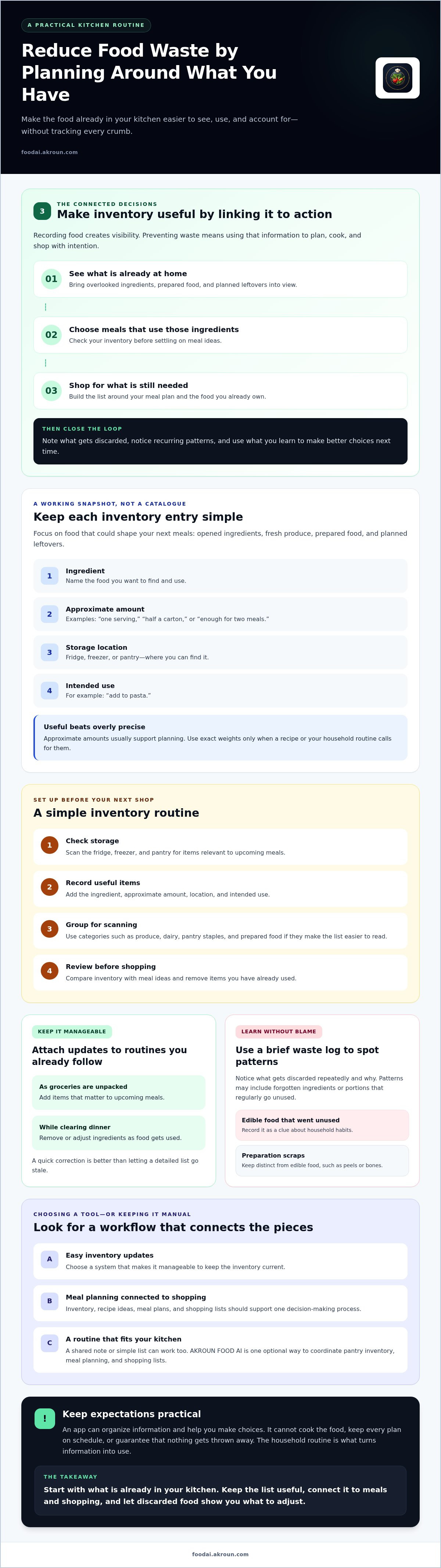
A reduce food waste app can help organize three connected decisions: what food is at home, what meals can use it, and what belongs on the next shopping list. That’s different from simply tracking food. Recording an ingredient creates visibility; preventing waste means using that information to plan, cook, and shop with intention.
Start with the kitchen you have, not an idealized meal plan. Forgotten leftovers, duplicate purchases, and ingredients bought without a clear use can slip through when no one has a reliable view of what’s available. An app can make those gaps easier to spot, but the household routine determines whether the food gets used.
What kitchen problems can an app help you see?
Incomplete inventory can make planning harder. You might buy another carton of broth because the open one is hidden behind other items, or choose a meal that ignores vegetables already on hand. Notice what gets discarded repeatedly and why. Distinguish edible food that went unused from preparation scraps, such as peels or bones. This isn’t about blame. It’s a way to understand what food waste is and identify household habits you could adjust.
What a food waste app can and cannot do
An app can bring inventory, recipe ideas, meal plans, and shopping lists into one decision-making process. For example, knowing you have rice and vegetables may help you choose a meal that uses both before adding more groceries to the list. But suggestions are only as useful as the information you provide. If ingredients are missing, amounts are outdated, or plans change without an update, the app’s view of your kitchen becomes less reliable.
Keep expectations practical. An app organizes information and helps you make choices; it can’t cook the food, keep every plan on schedule, or guarantee that nothing gets thrown away. Begin by checking what you have and recording the items that matter to upcoming meals. Then look for patterns before changing how you shop. That feedback loop gives you a clearer basis for decisions without turning kitchen management into a second job.
How to Build a Simple Food Inventory Before Ingredients Go Unused
A useful inventory is a working snapshot, not a catalogue of everything in your kitchen. Start with food that could shape your next meals: opened ingredients, fresh produce, prepared food, and planned leftovers. Keep each entry simple, with four details: ingredient, approximate amount, storage location, and intended use. “Spinach, half a bag, fridge, add to pasta” is more actionable than a precise weight you’re unlikely to maintain.
Set up the first version before your next shop. Use this short sequence:
- Check storage. Scan the fridge, freezer, and pantry for items relevant to upcoming meals.
- Record useful items. Add the ingredient, approximate amount, location, and intended use.
- Group for scanning. Use categories such as produce, dairy, pantry staples, and prepared food if they make the list easier to read.
- Review before shopping. Compare the inventory with your meal ideas and remove items you’ve already used.
What should you track in a home food inventory?
Prioritize ingredients that are easy to overlook or already have a place in a planned dish. Include leftovers you intend to eat, not every scrap or condiment. Approximate amounts such as “one serving,” “half a carton,” or “enough for two meals” usually support planning. Use exact weights only when a recipe or your household routine calls for them. The United Nations Environment Programme also recommends practical habits to cut your food waste, including mindful shopping and proper storage.
How can you keep inventory updates manageable?
Attach updates to a routine you already follow. Add groceries as you unpack them, then remove or adjust ingredients while clearing dinner. A quick correction is better than letting a detailed list go stale. The key is to keep pantry inventory and meal plans in sync: planned meals should reflect what’s actually in storage, and the inventory should change as food gets used.
A reduce food waste app can support that workflow, but a shared note or simple list can work, too. If you’d rather coordinate pantry inventory with recipe creation, meal planning, and shopping lists, AKROUN AI Chef’s kitchen planning tools are one option to consider.
How to Plan Meals and Shopping Around Food You Own
Plan from your kitchen outward. Before choosing dishes or adding groceries, check your inventory and identify ingredients that should shape the next meals. Start with one or two anchors, such as cooked rice and vegetables, rather than trying to force every available item into one dish. Then choose recipes that fit your household’s preferences, schedule, and cooking time.
A flexible meal can make this easier. Choose a recipe that allows suitable substitutions, but check that changes still meet dietary needs and follow safe food-handling practices. For more ideas on turning available ingredients into dishes, consult a guide to generating recipes from pantry ingredients.
How do you turn existing ingredients into meals?
Give ingredients most likely to go unused first consideration, then build a meal around them. If you have spinach and cooked grains, for example, plan a grain bowl or add the spinach to a dish your household already enjoys. Keep the plan realistic: a recipe that looks appealing but takes more time than you have may leave ingredients unused again. A reduce food waste app can connect inventory with recipe ideas and meal plans, but you still choose what fits your table.
How can a shopping list prevent overbuying?
Once you’ve selected meals, compare each recipe’s ingredients with what’s already recorded. Check approximate amounts before adding anything. If a plan calls for rice and you have enough in the pantry, leave it off the list. Separate what a recipe requires from optional additions, such as toppings or extra sides. This keeps the list focused and makes trade-offs clear.
An inventory-informed shopping list can help you avoid duplicate purchases by prompting you to check what you already own before adding another item.
Review the list once more before shopping. Remove ingredients covered by current stock, and adjust quantities to match the meals you’ll actually prepare. A connected workflow can bring pantry inventory, meal planning, and shopping lists together; AKROUN AI Chef is one optional tool with these capabilities. Whether you use an app or a written list, keep plans flexible. If schedules change, move a meal to another day or revise the plan around ingredients that still need a use. The goal is a shopping list that serves your real week, not a fixed menu you have to follow at all costs.
How to Track Food Waste and Improve Your Routine Over Time
A waste record only helps if it’s easy enough to maintain. Note what you discarded, roughly how much, and the practical reason it went unused. A quick entry such as “cooked lentils, about one serving, plans changed” gives you more to work with than a vague reminder that food was wasted.
Choose a format your household will actually use: a note in an app, a paper list near the kitchen, or another shared record. Keep entries brief. Categories such as spoiled, forgotten, prepared too much, or plans changed can make patterns easier to scan, but keep only the categories that help you decide what to adjust. An imperfect record is still useful; consistency matters more than detail.
What is useful to record when food is discarded?
Capture the ingredient or dish, an approximate amount, and why it wasn’t eaten. For example, note whether leftovers were overlooked, a fresh ingredient spoiled before its planned meal, or a schedule change disrupted dinner. Don’t spend time weighing small amounts or reconstructing every detail. The aim is to collect enough information to recognize repeat causes, not to create a perfect account of every kitchen decision.
How do you turn waste notes into better decisions?
Review your notes periodically and look for a pattern you can act on. If produce often spoils before you use it, consider buying a smaller quantity or assigning it to an earlier meal. If prepared food is regularly left behind, revisit portions or plan how leftovers will be served. Change one habit at a time, then see whether the same issue continues. Keeping the adjustment specific makes it easier to tell what helped.
Record what was discarded, identify a recurring cause, change one planning or shopping habit, and check whether the pattern returns. Use your own notes as a household baseline rather than relying on a promised savings figure or a generic target. A reduce food waste app may help keep planning and inventory information organized, but the value of a tracking routine comes from the decisions you make with it.
If you want to coordinate pantry information with meal planning, explore AKROUN AI Chef’s kitchen planning tools as one option for organizing those decisions.
How to Choose a Reduce Food Waste App That Fits Your Kitchen
The right app should fit the way your household already cooks, shops, and shares kitchen tasks. Prioritize easy inventory entry, useful recipe and meal-planning tools, and a shopping-list workflow that reflects what’s on hand. A reduce food waste app should make those decisions easier to coordinate, not add so much upkeep that records quickly become outdated.
Which app features matter for reducing household food waste?
Check whether pantry records can inform recipe ideas, meal plans, and shopping lists. Then consider whether the app can accommodate your household’s dietary needs and cooking routines. A feature matters only if you’ll use it consistently. Treat notifications, expiry tracking, waste reports, and integrations as optional until you verify that the app provides them and understand how they work.
| Function | What to look for | Priority |
|---|---|---|
| Inventory | Simple records for ingredients and amounts you can keep current | Essential |
| Meal planning | Recipes and plans that can account for available ingredients and household preferences | Essential |
| Shopping list | A list you can compare with current inventory before shopping | Essential |
| Extra tools | Notifications, expiry tracking, reports, or integrations, if confirmed and useful to your routine | Optional |
Test the workflow, not just the feature list. Ask how often you’ll need to enter the same information twice, whether other household members can follow the process, and how easy it is to adjust when plans change. Connected records can reduce repeated manual work, but only if they stay accurate enough to guide decisions.
How does AKROUN AI Chef fit into this workflow?
AKROUN AI Chef brings together recipe creation, meal planning, pantry inventory management, and shopping-list generation. That combination may suit households looking to coordinate those decisions in one workflow. Consider whether its capabilities match your tracking needs, dietary preferences, and cooking habits. Don’t assume it includes alerts, expiry reminders, or waste reports unless those features are verified.
Start by identifying the kitchen task you most want to simplify, then compare tools against that need. If you’re looking for connected pantry, recipe, planning, and shopping functions, explore AKROUN AI Chef as one option. An app can organize information, but your household’s routine still determines how well that information translates into meals and shopping choices.
Make Your Next Kitchen Cycle Count
A useful food-waste routine starts with a current view of what’s at home. Check inventory before planning, build meals around ingredients you’re ready to use, and review your shopping list before buying. Keep a brief note of food that gets discarded, too. Repeated patterns can point to one practical adjustment, such as buying a smaller amount or planning leftovers into another meal.
The best reduce food waste app for your household is one that fits its habits and connects those decisions without creating more work. AKROUN AI Chef brings together pantry inventory, recipe creation, meal planning, and shopping-list generation, with settings for dietary preferences and goals. These tools can support a more coordinated kitchen routine, while the choices and updates remain yours.
Explore AKROUN AI Chef to see whether its planning workflow suits your kitchen. Start with one small habit, keep it manageable, and build from there. Each thoughtful check before shopping or cooking is a practical step toward using more of what you already have.
Frequently Asked Questions
Can a food waste app actually reduce food waste?
Yes, a food waste app can support waste reduction by helping you connect food inventory with meal-planning and shopping decisions. Its value depends on keeping information reasonably current and using it to guide your routine. For example, checking what you have before shopping can help you avoid buying an ingredient you already own. An app can organize those choices, but it can’t guarantee that food will be used.
How do I use an app to stop food from expiring?
Use the app to make ingredients easier to include in upcoming meals. Record food you want to use, check that list before planning, and choose dishes that fit your schedule and household preferences. Review the inventory before shopping so you don’t overlook items already at home. If the app offers date tracking, enter dates accurately and check the product’s instructions. Don’t rely on an unverified reminder feature or on dates alone to assess food safety.
What should I track in a food inventory app?
Track ingredients that can affect your next meals: opened items, fresh produce, planned leftovers, and useful pantry or freezer staples. For each item, note its name, approximate amount, storage location, and intended use if that helps you plan. “Half a carton of milk, fridge, breakfast” can be more useful than an exact weight. Keep the record focused so it remains practical to update and review.
Can a meal planning app use ingredients I already have?
Some meal-planning tools can use pantry information to inform recipe ideas and meal plans. Check whether the app connects inventory with planning rather than treating them as separate lists. The results depend on the ingredients and amounts you enter, as well as your household’s preferences and dietary needs. If a plan changes, update your choices and inventory so the next recommendations and shopping list reflect what’s actually available.
How often should I update my food inventory?
Update it whenever it’s easy to do within your normal kitchen routine. Add groceries while unpacking, then remove or adjust items as you cook or clear dinner. Before shopping, review the list and correct anything you know has changed. You don’t need a perfect record of every item. A simple inventory that stays reasonably current is more useful for planning than a detailed list that no longer reflects your kitchen.
Do food waste apps track expiry dates automatically?
Not necessarily. Expiry-date tracking and automatic reminders vary by app, so check the specific app’s feature details before relying on them. Some workflows may require you to enter dates yourself; others may not offer date tracking. If a date matters to your planning, record it accurately and use appropriate food-safety guidance. Regardless of app features, review food regularly and prioritize items you intend to use soon.


